M91 Game Download APK Latest Version Free For Android 2026
TodaySize
11 MBVersion
v1.0Requirements
Android 5+Downloads
11K+
Description
M91 Game is an online mobile gaming platform that users may explore through its app or supported website. People searching for M91 Game usually want clear information about its features, APK download, account registration, login process, and available gaming options. Understanding these details before creating an account can help users make informed decisions and avoid common problems.
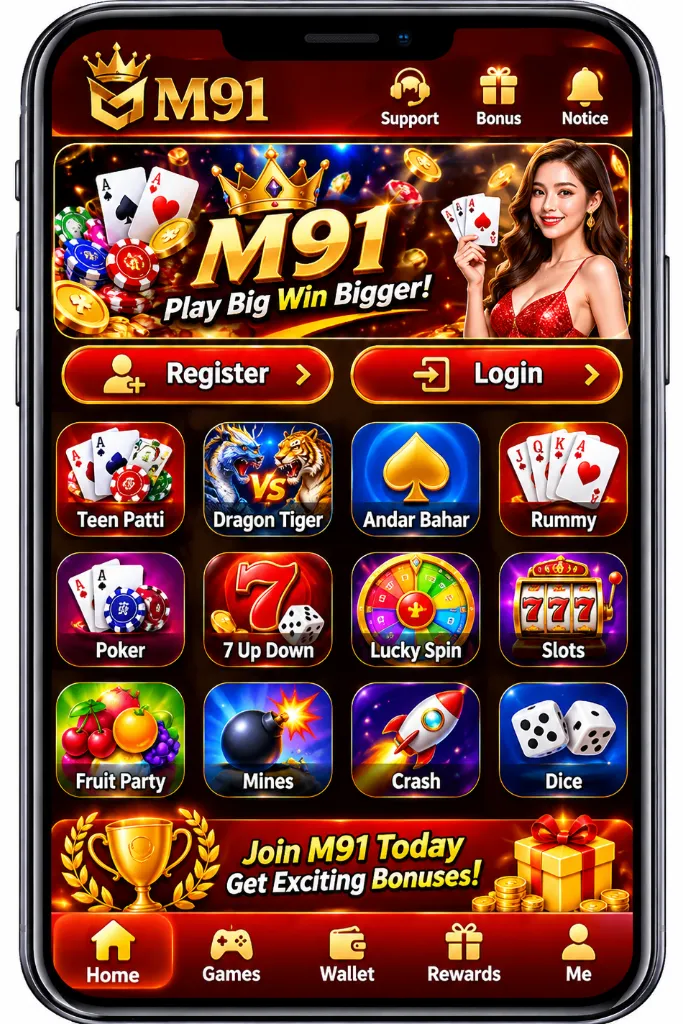
This guide covers the important aspects of M91 Game, including the M91 APK, Android installation, new account setup, login instructions, app features, account security, and customer support. Whether you are visiting the platform for the first time or already have an account, this article provides a helpful overview of the steps and information worth checking before getting started.
What Is M91 Game?
M91 Game is the name used for an online gaming platform that users may search for when looking for mobile entertainment and account-based gaming services. Its website or application should be checked directly to understand which games, services, and account options are currently available. Users should always confirm that they are accessing the genuine platform rather than an unofficial website or modified application.
The M91 Game app is particularly relevant to Android users looking for a mobile-friendly experience. Before downloading the M91 APK, it is important to check the application’s publisher, version information, permissions, and installation requirements. These basic checks can help users understand what they are installing and protect their devices from potentially unsafe files.
YOU MAY ALSO LIKE THIS APP : jz92
M91 Game Main Features
Before registering with any online gaming platform, users should understand its available features. The following are important areas to explore when reviewing M91 Game.
1. Mobile-Friendly Interface
A simple interface makes it easier for users to navigate an application. When exploring M91, check whether its menus, account settings, and available sections are clearly organized. A well-arranged layout can make everyday navigation more convenient.
2. Android APK Availability
Users searching for M91 APK download should first check whether an official Android application is available. Always obtain installation files from a verified source and review the APK version before installing it.
3. Account Registration
The M91 register option is an important part of accessing account-based services. New users should carefully review the registration requirements, provide accurate information, and understand the platform’s account policies before submitting their details.
4. Secure Login Access
The M91 login section allows existing account holders to access their accounts. Users should keep their passwords private and avoid entering login information on suspicious websites or unfamiliar pages.
5. Account Management
Account management options can help users review their personal information, update permitted settings, and check account-related information. It is useful to understand these options before using the platform regularly.
6. Customer Support
Customer support is important whenever users experience login difficulties, registration errors, or other technical problems. Check whether M91 provides verified support channels and review its available service hours before requesting assistance.
7. Clear Account Information
Before using any platform, users should be able to review its terms, privacy policy, age requirements, and applicable restrictions. Clear information helps people understand their responsibilities and the conditions attached to their accounts.
How to Download M91 APK for Android
Users who want to install the M91 Game application should follow a careful download process. An APK file is an Android application installation package, but downloading one from an unknown source can create security risks.
Follow these general steps:
- Open the verified official M91 website using your mobile browser.
- Look for the Android app or M91 APK download section.
- Check whether an official application is actually available.
- Review the displayed application version and file size.
- Check the publisher and available security information.
- Download the APK only if the source is trustworthy.
- Locate the downloaded file in your phone’s Downloads folder.
- Review the Android installation prompt and requested permissions.
- Complete installation only if the application and its permissions appear legitimate.
Important: Do not install modified APK files or applications shared through unknown links. If the official source cannot be verified, avoid downloading the file.
How to Install the M91 App
After obtaining a verified M91 APK file, Android users can follow the standard installation procedure.
- Open the File Manager on your Android device.
- Navigate to the Downloads folder.
- Find the M91 APK installation file.
- Tap the file to open the Android installation screen.
- Review the application name and permissions.
- Continue only if the information is consistent with the verified source.
- Wait for the installation process to finish.
- Open the application and review its available options.
If the M91 app does not install, check your available storage space, Android compatibility, and whether the downloaded file is complete. Avoid disabling device security protections simply to install an unverified application.
How to Register on M91 Game
The M91 Game register process is intended for new users who want to create an account, if registration is available in their region. Before proceeding, review the platform’s eligibility requirements and account policies.
M91 Account Registration Steps
- Visit the verified M91 website or open its authenticated application.
- Find the Register or Sign Up option.
- Review the registration requirements.
- Enter the information requested by the official registration form.
- Provide a valid contact detail if verification is required.
- Complete the verification process through the official method.
- Read and understand the platform’s terms and privacy policy.
- Submit the registration form if you meet the eligibility requirements.
- Keep your account credentials in a secure place.
Always use accurate information and never share your OTP, password, or verification code with another person.
How to Login to M91 Game
Existing users may use the M91 login section to access their accounts. The login process should be completed only through a verified website or genuine application.
M91 Login Instructions
- Open the official M91 website or verified app.
- Select the Login option.
- Enter your registered username, mobile number, or other requested account identifier.
- Type your correct password.
- Complete any additional security verification if requested.
- Review the entered information.
- Submit the login form.
- Wait for the account dashboard to appear.
If you cannot access your account, check your login details and internet connection. Use the official password recovery option if available. Never share your account credentials with someone claiming to provide login assistance.
M91 Game App Compatibility and Requirements
Before installing an Android application, users should check whether their device meets its technical requirements. The exact M91 app compatibility details should be confirmed from its verified publisher because minimum Android version, APK size, and supported devices may change between releases.
Consider these points before installation:
- Operating System: Check the minimum supported Android version.
- Storage Space: Make sure sufficient free storage is available.
- Internet Connection: A stable connection may be required for online features.
- Application Version: Verify that the installation file is current and authentic.
- Device Security: Keep Android security updates and scanning protections enabled.
Do not rely on unverified version numbers, file sizes, or compatibility claims.
M91 Game Account Security and Privacy
Account security should be a priority when using any online application. Users should understand how their information is collected, stored, and processed before creating an account.
Here are some useful security practices:
- Create a strong password that is not used on other websites.
- Never share your password or one-time verification code.
- Avoid opening login links received from unknown sources.
- Use a secure internet connection when accessing your account.
- Review the application’s permissions before installation.
- Read the privacy policy to understand how personal information is handled.
If you notice unusual account activity, contact the platform through its verified support channel and follow its recommended security procedures.
Common M91 Game Problems and Possible Solutions
Sometimes users experience technical difficulties while accessing an online application. Understanding common problems can make troubleshooting easier.
M91 APK Not Installing: Check the downloaded file, device compatibility, and available storage. Do not install an APK from an untrusted source.
M91 Login Not Working: Verify your account details, check your internet connection, and use the official recovery option if necessary.
Registration Error: Review the required information and check whether your account meets the platform’s registration conditions.
Application Not Opening: Restart your device and check whether the application has a compatible version. Reinstall only from a verified source.
Verification Code Not Received: Check your contact information and network connection. Request another code through the official verification process if available.
Important Things to Check Before Using M91 Game
Before creating an M91 account or downloading its application, take time to review the platform’s important information.
- Confirm the authenticity of the official website.
- Check the application’s developer and publisher.
- Review the terms and conditions.
- Understand the privacy and data protection policy.
- Check age and regional eligibility requirements.
- Look for verified customer support details.
- Avoid platforms or individuals promising guaranteed profits.
- Never risk money you cannot afford to lose.
If the platform offers real-money gaming, understand the financial risks and applicable local laws before participating. Do not treat gaming as a reliable source of income.
Frequently Asked Questions (FAQs)
1. What Is M91 Game?
M91 Game is the name of an online gaming platform that users can research for information about its app, account services, and available features. Check its verified website for accurate details.
2. How Can I Download M91 APK?
If an official Android APK is available, visit the verified publisher’s website, review the application details, and download it only from a trustworthy source.
3. How Do I Register on M91 Game?
Visit the verified platform and select the Register option if available. Follow the official instructions, provide the required information, and complete any requested verification.
4. How Can I Access M91 Login?
Open the verified M91 website or application, select Login, and enter your registered account details. Use the official recovery process if you forget your password.
5. Is M91 Available for Android?
Android availability should be confirmed through the platform’s verified website or application publisher. Check device compatibility before installing any APK file.
6. What Should I Do If M91 APK Does Not Install?
Check your Android version, available storage, and the integrity of the downloaded file. Avoid using modified or unofficial installation packages.
7. How Can I Keep My M91 Account Secure?
Use a strong password, protect your verification codes, avoid suspicious links, and access your account through verified channels.
Conclusion
M91 Game is a platform that users may want to explore for information about mobile gaming, APK availability, account registration, and login access. Before getting started, it is important to verify the official website, check the application’s technical details, and understand the available services. Taking these steps can help users make better decisions and avoid unnecessary security or installation problems.
Whether you are researching M91 Game download, looking for an M91 APK, or trying to understand the registration and login process, always rely on accurate information from verified sources. Review the platform’s policies, protect your personal information, and make responsible decisions before using any online gaming service.
Download links
How to install M91 Game Download APK Latest Version Free For Android 2026 APK?
1. Tap the downloaded M91 Game Download APK Latest Version Free For Android 2026 APK file.
2. Touch install.
3. Follow the steps on the screen.